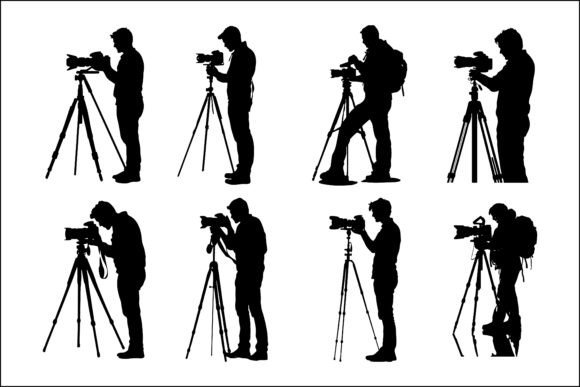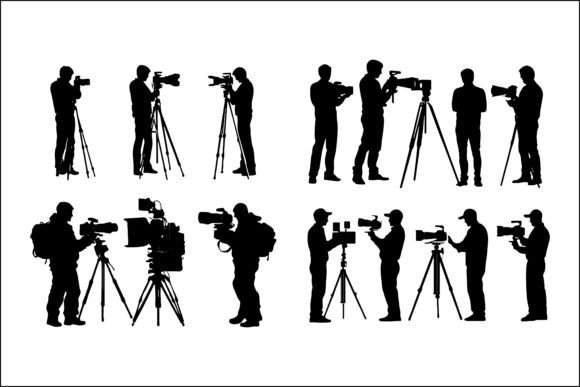
Dynamic Cameraman & Camera Gear Silhouette Vectors
Sometimes a simple shape can carry a whole story. The silhouette of a person holding a camera—or the outline of a tripod, lens, or shoulder rig—immediately suggests creativity, observation, and professional media work. These graphics have a quiet power: they work across dozens of designs, instantly setting a mood or clarifying a message without a single word. When you have access to a collection of dynamic cameraman silhouettes in EPS format, you’re not just getting pictures—you’re getting a flexible tool kit that can adapt to almost any visual project.
But what exactly are camera silhouettes and camera gear silhouettes? Think of them as bold, solid-black or single-color outlines that capture a recognizable moment: a videographer crouching low, a photographer aiming a DSLR, a boom operator holding a microphone, or even the stark shape of a compact camera. Because they’re delivered as EPS files, they stay crisp at any size, from a tiny app icon to a giant trade show banner. The value lies in their versatility, professional look, and the immediate credibility they lend to anything related to photography, filmmaking, or media.
What Makes These Silhouette Assets Special
A typical image can sometimes be too busy or literal. A silhouette, on the other hand, distills the subject down to its essence. With cameraman silhouette vectors, you can imply action, passion, and profession all with one clean graphic. The dynamic poses in this collection—running shots, steady shoulder-mounted camera work, and even casual suit-and-tie cameramen—give you more than just a static icon. They bring motion and storytelling into the composition.
These vector files are particularly appealing because they handle resizing without losing sharpness. EPS is a format that professional designers trust; you can open it in Adobe Illustrator, CorelDRAW, Affinity Designer, and many other applications, then customize the color, remove pieces, or group elements together. That means you aren’t locked into pure black. You can tint a silhouette orange for a vibrant social media post, or make it white to sit on a dark website header.
Where a Simple Silhouette Solves Real Problems
Let’s imagine you run a small video production company. You need a new website icon, a quick poster for a local film workshop, and a set of matching Instagram story graphics. Hiring an illustrator for each tiny task would eat up time and budget. Instead, with a single folder of dynamic cameraman silhouettes, you can pull one outline for the site header, another for the poster, and a third for a story sticker—all feeling unified and professional.
Or consider an educator building an online course about documentary filmmaking. Slides packed with text can bore students. Adding a clear silhouette of a shooter with a cinema camera next to a key concept—like “Field Recording Setup”—reinforces the lesson without causing distraction. It’s a lightweight way to maintain visual interest and help students quickly associate the graphic with the topic.
For hobbyists who post their photography or videography journeys on social media, camera gear silhouettes can become a signature style. Overlay them on sky shots, use them as subtle watermarks, or place them on announcement banners for new content. They give an amateur feed a polished, curated feel without demanding advanced graphic design skills.
Practical Uses Across Creative and Professional Contexts
One of the strongest reasons to keep a toolkit of EPS cameraman silhouettes at hand is the sheer range of applications. Here are some realistic ways people put them to work every day:
- Web Design: Film, media, or photography websites often need quick visual cues—maybe a “Portfolio” icon shaped like a camera, or a hero image accent that doesn’t compete with text. Silhouettes add depth and reinforce the theme without overwhelming the layout. They also work well in UI elements like drop-down menus or footer dividers.
- Logo Design: Branding for a videography studio, photography club, or media podcast can start with a strong silhouette. You can combine a camera silhouette with a typography treatment or frame it within a lens shape. Because the vectors are editable, removing or combining elements is easy, giving you a unique mark that no one else will have exactly.
- Social Media: Platforms like Instagram, Facebook, and Twitter reward eye-catching imagery. Quickly layer a distinctive cameraman silhouette onto a colorful background, add a subtle shadow, and you have a post that stands out in a feed. Use them for “video upload coming” teasers, Q&A announcement cards, or even as profile picture borders.
- Print Media: Brochures, flyers, business cards, and event posters benefit from high-contrast visuals. A film festival poster, for instance, might feature a bold silhouette of a cameraman in the foreground, with movie titles fading into the background. Because EPS files are resolution-independent, you can scale them to billboard size without a pixel in sight.
- Presentations: Slides for a media production workshop, a pitch deck for a video service, or a portfolio review can all use camera gear silhouettes as icons next to bullet points or as background motifs. They immediately tell the audience the subject matter while keeping the design minimalist and elegant.
- Advertising: Online banners and print ads promoting camera equipment rental, a new lens, or a filmmaking masterclass often struggle to show both product and emotion. A silhouette can convey the human element—creativity, focus, expertise—while text or product images do the rest. The contrast makes the ad more scannable and memorable.
- Merchandise: Custom apparel, mugs, or tote bags for media enthusiasts tend to sell best when the design is confident and recognizable. A well-chosen silhouette of a classic film-camera operator or a contemporary videographer with a gimbal can become a conversation starter on a T-shirt or hoodie. Since vectors are simple to engrave or screen-print, production costs often stay low.
- Educational Material: Tutorials, e-learning modules, and handbooks for photography or filmmaking can use these graphics to break up instructions, label diagram parts, or mark chapter headings. They serve as a visual cue that tells students: “We’re talking about practical, hands-on technique now.”
- Mobile Apps: Media and video production apps need icons that are instantly readable at tiny sizes. A camera silhouette for the “Record” function or a compact camera gear silhouette for settings related to lens choices can improve user experience without extra text.
- Infographics: When explaining a production workflow—from scripting to color grading—infographics use symbols to guide the eye. A sequence of dynamic cameraman silhouettes in different poses can illustrate each phase, making the process feel alive rather than abstract.
Why EPS Files Give You Extra Power
Receiving all the files in EPS format is a detail worth paying attention to. EPS (Encapsulated PostScript) files let you edit paths, change fills, adjust strokes, and even merge multiple silhouettes into one composition. If you like a certain pose but wish it included a specific piece of gear, you can mix and match—perhaps take the body of one figure and the camera from another. This collection typically includes a mix of subjects: lone photographers, two-person news crews, tripod setups, handheld stabilizers, and more. With vector layers, you have control over every curve, meaning the same resource can behave like a building block for dozens of unique creations.
Things to Consider Before You Jump In
While camera silhouettes and camera gear silhouettes are incredibly handy, a few practical checks will help you get the best results. First, always verify the licensing. Many vector packs, especially those described as “you will get all EPS files,” come with commercial use permissions, but it’s smart to confirm whether credit is required for print-on-demand products or large-scale advertising. A quick glance at the included license document can save confusion later.
Next, think about consistency. If your brand already uses a specific icon style—such as thin lines, geometric abstraction, or retro flair—test how these dynamic silhouettes fit alongside existing assets. A realistic silhouette might clash with minimalist line icons, so you may want to apply a uniform stroke or color treatment to bring everything together. On the other hand, if your brand is bold and cinematic, the strong black fills may be exactly the punch you need.
Color and contrast also matter. A silhouette that works wonderfully against a light background might vanish on a dark website or dark mode app. Since you’re working with vectors, you can invert colors or add a glowing outline in seconds. The key is to test in context—place the graphic where it will actually live, on a phone screen mockup or a printed test page, to see how it reads from a distance.
Additionally, if you’re new to vector editing, EPS files can sometimes look locked or flat when you first open them. Don’t worry; this is normal. Most graphic software allows you to ungroup elements and select individual paths. There’s a small learning curve, but once you figure out the basics of selecting and recoloring, you unlock a whole world of custom possibilities. Plenty of free video tutorials show how to handle EPS files in under ten minutes.
Making the Most of Dynamic Poses
A static outline of a camera does one thing; a dynamic pose does another. The collection isn’t just about “a person with a device.” It’s about the storytelling angle. A silhouette of a cameraman kneeling can suggest behind-the-scenes production. One stepping forward with a shoulder rig implies fast-paced documentary work. Even the more relaxed poses—someone casually reviewing footage on a small screen—can humanize a tech-heavy webpage or app. When you select a pose, ask yourself: What emotion or action do I want viewers to associate with this section? Picking the right gesture makes the design feel intentional rather than decorative.
You can layer silhouettes to create a scene. Overlay two figures at different scales, position a camera gear element like a tripod or boom microphone in the foreground, and suddenly a simple graphic becomes a mini-composition that tells a complete story—useful for film festival headers or “About Us” pages that showcase a team at work. Because these vectors don’t require any background, they can be placed on photographs, gradients, or textures seamlessly.
Connecting Your Projects to a Wider Visual Language
Silhouettes tap into a universal form of communication. Across cultures, people instantly recognize the shape of a person filming. By using camera gear silhouettes and cameraman silhouette vectors, you’re hooking into that instant recognition. It’s why they’re so effective in advertising, social media, and educational materials—and why a single pack can pay for itself many times over with the time it saves and the professional edge it provides. Whether you’re sprucing up a YouTube channel banner or designing a full brand identity for a media startup, having a library of clean, scalable, and genuinely useful silhouettes at your fingertips is one of those design decisions that just makes sense.