Nomano - Google Slide Template: Flexible Presentation Design
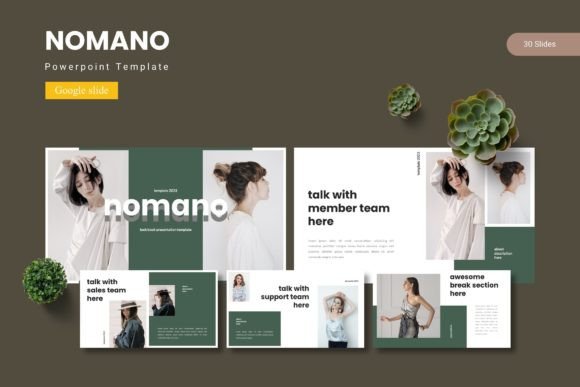
When someone sits down to build a presentation, the blank slide can feel more like a barrier than an invitation. That moment is exactly where Nomano - Google Slide Template changes the workflow. It hands you a fully designed, thoughtfully structured set of Google Slides so you can skip the staring contest with an empty canvas and move straight into shaping your message. Rather than a single rigid layout, the Nomano template package delivers 150 total slides spread across five distinct color schemes. That depth means you are not locked into one look, and you can adapt the same design language to multiple projects, audiences, or brand voices without starting from scratch every time.
What Actually Arrives Inside the Nomano Template
Many slide templates promise variety but deliver little more than a handful of reused layouts. The Nomano set is built differently. Inside the folder you will find five separate Google Slides files, each containing 30 slides. This totals 150 slides, all editable and crafted around a master slide structure. Because every theme shares a common backbone, you can mix and match slides across color schemes without breaking visual consistency. Section break slides help you organize longer narratives, whether you are pitching a startup, running a workshop, or reporting quarterly results.
The collection includes handcrafted infographic elements, drag-and-drop picture placeholders, and purpose-built gallery and portfolio slides. Every graphic is fully resizable and editable. You are not stuck with static clip art; you can change shapes, recolor icons, and adjust chart components to illustrate exactly what your data demands. A readme file inside the package clarifies how to use the slide masters efficiently, while separate documents cover font choices and photo usage, so there is no guesswork around licensing or typography preferences.
Why Different Audiences See This Template Differently
A busy entrepreneur preparing a five-minute pitch deck values one thing above all else: speed. That same template, however, might land in front of a graphic designer who cares deeply about kerning, grid alignment, and color harmony. A college instructor might need slides that hold up over a 45-minute lecture without visual fatigue, while a blogger could simply want a clean backdrop for a webinar. Nomano - Google Slide Template does not treat all these people identically, because the structure makes room for each priority without forcing compromises.
A small business owner might immediately appreciate the five preset color schemes. Instead of hiring someone to find a palette that matches a logo, they can pick the theme closest to their identity and tweak from there. The drag-and-drop image placeholders mean they can swap product photos, team headshots, or storefront pictures in seconds. Meanwhile, a freelance brand strategist who works with multiple clients will likely value the template’s reusability. They can open a fresh copy for each client, change the accent color to match the brand guide, and still have 150 distinct slide options across projects.
Beginners and the Fear of Starting From Nothing
For someone who is not comfortable with design tools, presentation software can feel intimidating. Nomano acts as a quiet mentor. Because every slide is built on a master slide foundation, simple changes cascade automatically. A beginner can open the master, adjust a font or a bullet style, and see that change reflected throughout the entire presentation. This reduces accidental inconsistency—the mismatched headers, slightly off-center text boxes, and jarring font sizes that often betray a novice effort.
The gallery and portfolio slides are especially helpful for hobbyists or first-time business owners who want to showcase physical products, artwork, or event photos. Instead of wrestling with image alignment guides, they can drop a picture into a placeholder and see it snap into a balanced composition. The template handles the visual math; the user simply picks the images that tell their story. For a crafts maker turning a weekend hobby into an online shop, this means social media slides, product catalogs, and even a quick line sheet can all live inside the same design environment without requiring a separate design app.
Seasoned Professionals and the Search for Polish
An experienced marketing lead or consultant often has a clear internal benchmark for presentation quality. They have likely seen enough bad slides to know that audiences judge credibility within seconds. For these users, the pixel-perfect illustrations and consistent grid system inside Nomano - Google Slide Template matter more than the sheer slide count. The handcrafted infographics allow them to explain processes, timelines, and comparative data without defaulting to the standard bullet list that audiences glaze over.
A corporate trainer delivering compliance updates to a team of thirty may need slides that feel authoritative but not cold. The five color schemes provide a way to signal tone: a muted, earthy palette for sensitive HR material, or a brighter accent set for team-building kickoffs. Because every graphic is editable, complex flowcharts can be broken apart and recolored to highlight specific steps without rebuilding from scratch. The master slide approach also means that last-minute requests, like adding a company logo to every footer, take only a few clicks.
Educators and the Need for Clear, Distraction-Free Slides
Teachers and university instructors balance content density with readability. A lecture slide packed with text loses students quickly, while a slide that is too sparse can lack necessary context. The Nomano template hits a comfortable middle. Its layouts offer generous space for headings and supportive visuals, with structured grid areas for explanatory text when it is truly needed. The section break slides become natural pause points for classroom discussions, group activities, or Q&A segments.
An online course creator developing a 12-module program can duplicate the 30-slide base file for each module, adjusting only the color accent to differentiate sections. This keeps the student experience visually cohesive while reducing the creator’s weekly workload. The availability of infographic-style slides helps translate research findings, historical timelines, or theoretical frameworks into digestible visuals that students can screenshot and review later.
Portfolio Storytelling for Creatives and Freelancers
Visual artists, photographers, interior designers, and content creators often need a portfolio that feels like a curated experience, not just a sequence of images. The gallery and portfolio slides in this template are built for that narrative. Picture placeholders accept various aspect ratios without breaking the layout, so a mix of wide-angle shots and vertical portraits can coexist without awkward cropping.
A freelance photographer applying for a grant might use one color scheme to pitch a project, then swap to another scheme for a client-facing portfolio site PDF exported directly from Google Slides. Because the template remains fully editable, the photographer can add subtle branded elements like a monogram or a faint watermark through the master slide, preserving a professional edge without over-designing. Drag-and-drop functionality means they can rearrange image order in minutes based on who they are meeting that day.
Flexibility That Saves Time Without Hiding Complexity
A common worry with templates is that they trade originality for convenience. Nomano - Google Slide Template addresses that by exposing, rather than hiding, the building blocks. All infographic pieces and placeholder elements can be ungrouped, recolored, and resized independently. A user who wants to turn a three-step process infographic into a six-step version can copy and rearrange the shapes, then adjust the connecting lines. The underlying grid helps maintain alignment, but nothing is locked down beyond what the user chooses.
For marketing teams that need to produce weekly social media slide decks, brand recap presentations, or pitch updates, the speed advantage multiplies. A content strategist can spend an afternoon setting up a master copy with the brand’s fonts, logo placement, and approved accent colors. Once that base file exists, a junior team member can pull relevant slides from the 150-set library, fill in the placeholder text and images, and deliver a client-ready deck without needing to learn any additional tools.
Making the Most of the Five Color Schemes
The five premade color schemes are more than a cosmetic bonus. They offer a fast way to pivot tone and audience expectation. A nonprofit volunteer might use a warm, approachable palette for a community fundraiser presentation, then switch to a cleaner, high-contrast scheme for a grant proposal to a corporate foundation. The slides themselves remain structurally identical, which means the volunteer does not have to rethink every layout when the context changes.
Entrepreneurs pitching to different investor audiences can also benefit. A consumer-facing brand pitch might lean on bright, energetic colors, while a B2B software demo could adopt a more restrained professional scheme from the same template family. Because the Nomano template file structure keeps each color variation as a separate Google Slides file, it is easy to compare looks side by side without accidentally overwriting a finished version.
Long-Term Usefulness and Reusability
Templates that only work once feel wasteful. Nomano is designed to become a reliable toolkit. The 30-slide structure per color theme provides enough variety to build anything from a short ignite talk to a multi-hour workshop deck. When a project repeats—a quarterly business review, a monthly analytics summary, a recurring student orientation—you can duplicate the file, update the data, and stay confident that the visual quality will not degrade over time.
Freelance writers and consultants who deliver strategy presentations regularly often create a “master vault” of their most-used slide layouts. The handcrafted infographic elements in this template can serve as that vault. A consultant might reuse the timeline slide across six different client engagements, adjusting only the dates and milestones each time, while the professional polish remains unchanged. This turns a one-time purchase into an asset that keeps delivering value months and years later.
Accessibility also matters. Google Slides makes it simple to share, collaborate, and present across devices. The readme file offers straightforward guidance on font consistency and image handling, which helps users protect the template’s design integrity even when multiple people edit the same deck. The included photo information helps teams understand usage rights for any sample imagery, so there is no confusion about what can be published or shared publicly.
The Nomano - Google Slide Template pulls together visual variety, practical editing controls, and enough depth to serve multiple roles within a single download. Whether someone opens it to build their very first pitch deck or their fiftieth client presentation, the structure meets them where they are—offering speed for the time-strapped, flexibility for the design-aware, and clear guidance for anyone still building confidence with presentation tools.